📚 Library In–Out Module Overview
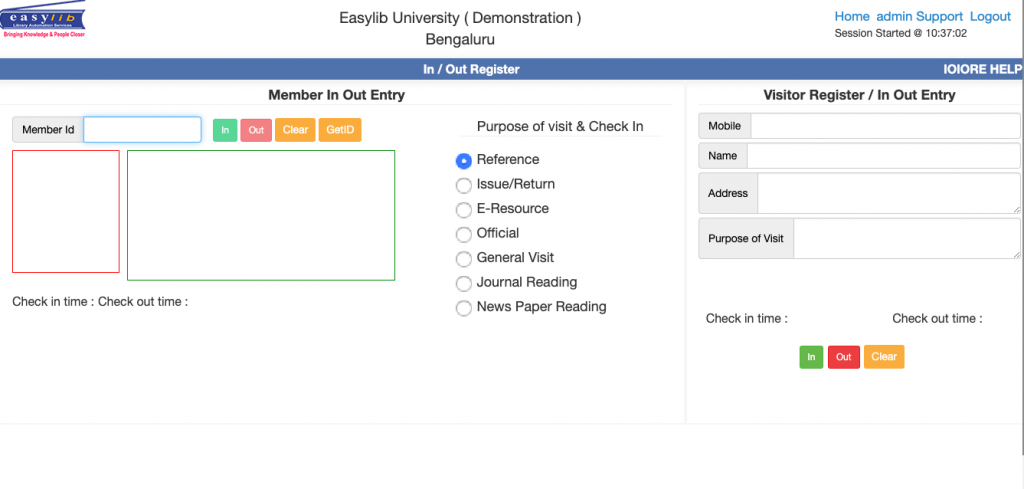
Easylib Software’s Visitor In/Out Management module provides an efficient, user-friendly solution to monitor library visitor activity in real time. With our system, users can quickly check in and out by simply swiping their ID card on an RFID gate reader, scanning a barcode, or manually entering their ID number.
Our intuitive interface ensures accurate record-keeping and automates the tracking process, while comprehensive reports and statistics offer valuable insights into visitor trends and peak usage times. This data-driven approach helps administrators optimize resource allocation, enhance security, and improve overall library operations.
Experience seamless visitor management with Easylib—where technology meets efficiency in every entry and exit.Students Inside Library
Displays a real-time list of all students currently inside the library. Shows details like Member ID, Name, Gender, Course, Branch, Member Type, Check-In Time, and Purpose.
Visitors In–Out Details
Tracks all visitor entries and exits, including external visitors or non-members. Captures visitor names, contact details, purpose of visit, and duration of stay.
In–Out Report
Generates a detailed daily or date-range report of all entries and exits. Filter by member type, department, or purpose and export to Excel or PDF.
In–Out Update
Allows authorized staff to manually update or correct entry/exit records, ensuring accuracy when users forget to scan IDs.
InOut Complete Report
Provides a comprehensive report of all library activity — including members currently inside and those who checked out.
Customized Report
Lets users create and save custom reports based on department, gender, course, or member type — perfect for specialized analysis.
Customized Statistical Report
Offers visual and numerical statistics — such as peak visiting hours, gender-wise usage, and daily entry counts.
Customized Search Report
Quickly search a member’s full In–Out history using their ID or name. Retrieve complete entry and exit data instantly.
Library Usage Report
Summarizes total entries, unique users, and total time spent inside — ideal for performance tracking or accreditation reports.
Students With No Exit
Lists members who checked in but haven’t checked out — ensuring safety and data integrity.
Statistical Report
Provides numeric summaries of entry–exit data across user categories. Filter by date, department, or user type.
Statistical Report for Members
Displays statistics for individual members — total visits, average stay duration, and visit frequency.
In–Out Percentage Wise Report
Visualizes entry–exit patterns by percentage to identify which departments or groups use the library most frequently.
In–Out Entry Options (1, 2, 3)
Provides multiple check-in/check-out methods — via RFID, barcode scanning, or manual entry, based on your setup.
In–Out Data Import
Allows bulk uploading of In–Out records from external systems or backups. Great for migration and synchronization.
📊 Graphical In–Out Report
Displays entry–exit trends using interactive charts and graphs categorized by time, department, or user group.